A Simple Cost Tracking System for Small Teams

Small teams don’t usually struggle because they lack effort. In most cases, the work is getting done, customers are being served, and projects are moving forward. The real issue shows up when you try to understand the numbers behind that work.
Costs feel scattered. Expenses show up in different places. Time gets tracked inconsistently, if at all. At the end of the month, you can see how much money came in and how much went out, but connecting those numbers back to specific jobs or projects is difficult.
That disconnect creates uncertainty.
You might feel busy, even successful, but you don’t have a clear answer to a simple question: Where is the money actually going—and which work is producing real profit?
A simple cost tracking system fixes that. Not by adding complexity, but by creating a clear structure that connects daily work to financial outcomes.
Why Small Teams Need Simplicity, Not More Tools
There is a natural tendency to solve tracking problems by adding more tools. One for expenses, one for tasks, one for invoicing, maybe another for reporting. Each tool solves a specific problem, but together they create a fragmented system.
For small teams, fragmentation is the real issue.
When information lives in different places, it becomes difficult to maintain consistency. Data gets entered multiple times or not at all. Updates are delayed. People rely on memory to fill in gaps. Over time, the system becomes harder to trust.
What small teams actually need is not more tools—it’s a simpler way to connect what they are already doing.
The goal is not to track more data. The goal is to make the data you already have usable.
What a “Simple” System Really Means
A simple cost tracking system is not one that ignores detail. It is one that organizes detail in a way that is easy to maintain and easy to understand.
At its core, a simple system does three things well:
- It captures costs consistently
- It connects those costs to the right work
- It provides visibility without extra effort
When those three elements are in place, everything else becomes easier. Decisions become clearer. Estimates improve. Profitability becomes predictable.
Start With the Unit That Matters: The Project
The foundation of any cost tracking system is the project. Every piece of work your team performs should be tied to a specific project, job, or client engagement.
Without this structure, costs exist in isolation. You might know how much you spent overall, but you won’t know what that spending produced.
By organizing your work into projects, you create a natural container for tracking costs. Every expense, hour, and resource can be linked back to that container. This is what allows you to understand performance at a meaningful level.
Capture Costs as They Happen
One of the biggest reasons cost tracking systems fail is timing. When costs are recorded days or weeks after they occur, accuracy drops. Details are forgotten. Receipts are lost. Estimates replace real data.
A simple system removes that delay.
Costs should be captured at the moment they happen or as close to it as possible. This includes materials, small purchases, and any direct expenses related to a project. The closer the data entry is to the actual event, the more reliable the system becomes.
For small teams, this does not require complex processes. It requires consistency. A habit of recording information in real time creates a level of accuracy that no amount of retrospective work can match.
Keep Categories Clear and Practical
Cost categories are necessary, but they should remain simple and practical. Overly detailed categorization can slow down the process and discourage consistent tracking.
For most small teams, a few core categories are enough:
- Labor
- Materials
- Subcontractors
- Miscellaneous project expenses
These categories provide enough structure to understand where money is going without creating unnecessary complexity. The goal is clarity, not perfection.
Connect Costs to Work, Not Just Accounts
Traditional accounting systems focus on accounts. They tell you how much you spent on categories like supplies or payroll, but they do not always show how those costs relate to specific projects.
A simple cost tracking system shifts that focus.
Instead of asking, “What did we spend on supplies this month?” you ask, “What did we spend on supplies for this job?”
This shift changes how you think about costs. It turns abstract numbers into actionable insights. You can see which projects are consuming resources and whether that consumption is justified by the revenue generated.
Costs only become meaningful when they are tied to outcomes.
Review Progress Regularly, Not Just at the End
Waiting until a project is complete to review costs is one of the most common mistakes. By that point, the outcome is already determined. Any insights you gain are useful for future work, but they cannot change the current result.
A simple system includes regular check-ins.
This does not need to be time-consuming. Even a brief weekly review can provide valuable insight. The goal is to compare expected costs with actual costs and identify any gaps early.
When you can see trends as they develop, you have the opportunity to adjust. That might mean reallocating resources, reducing unnecessary spending, or re-evaluating the scope of work.
Make It Easy for the Team to Participate
A cost tracking system only works if the team uses it. If the process is complicated or time-consuming, participation will drop. Data will become incomplete, and the system will lose its value.
Simplicity encourages adoption.
Each team member should know:
- What they need to track
- When to track it
- Where to record it
When the process fits naturally into their workflow, it becomes part of how work gets done, not an additional task.
Why Spreadsheets Break Down Over Time
Spreadsheets often serve as the starting point for cost tracking. They are flexible and easy to set up, which makes them appealing for small teams. However, as the business grows, their limitations become more apparent.
Data entry becomes inconsistent. Multiple versions of the same file appear. Updates are delayed or missed entirely. The connection between costs and projects weakens, and the overall system becomes harder to manage.
The issue is not the spreadsheet itself—it is the lack of structure and integration. Without a way to connect data across different aspects of the business, the spreadsheet becomes a static record rather than a dynamic tool.
How WorkBalance Simplifies Cost Tracking
WorkBalance was designed to solve this exact challenge by bringing structure and connection to everyday operations. Instead of managing projects, expenses, and tasks in separate tools, everything is integrated into a single system.
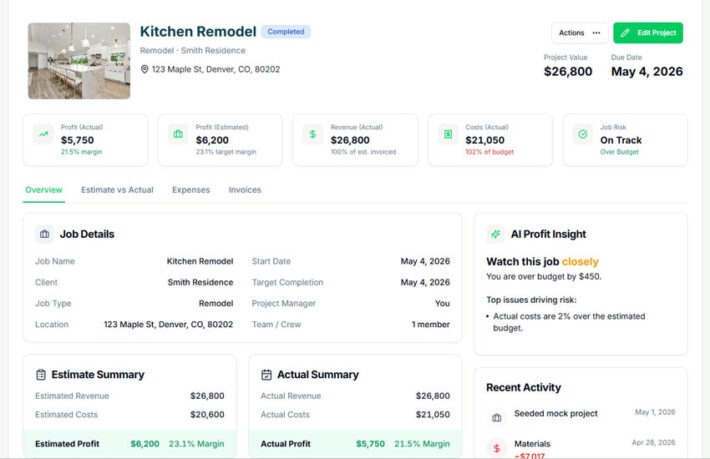
Projects serve as the central hub. As work is performed, costs are captured and linked directly to those projects. This creates a real-time view of how each job is performing financially.
Because tasks, expenses, budgets, and reporting are all connected, the system updates automatically as work progresses. There is no need to manually reconcile data or maintain multiple versions of the truth.
The system reflects your business as it operates, not as it was recorded later.
The Outcome: Clarity Without Complexity
When a simple cost tracking system is in place, the benefits are immediate.
You can see how each project is performing without digging through multiple sources of information. You can identify where costs are increasing and take action before they impact profitability. You can make decisions based on current data instead of assumptions.
Perhaps most importantly, you gain confidence.
You no longer have to guess whether your work is profitable. You can see it clearly, and that clarity allows you to move forward with greater certainty.
Final Thought
A cost tracking system does not need to be complex to be effective. In fact, the simpler it is, the more likely it is to be used consistently.
For small teams, success comes from creating a structure that fits naturally into the way work is already being done. When costs are captured, connected, and reviewed consistently, the business becomes easier to manage and easier to grow.
Simplicity is not a limitation—it is an advantage when it is applied correctly.
Take Control of Your Costs
WorkBalance helps small teams:
- Track project costs in real time
- Connect expenses directly to work
- Maintain visibility without extra effort
- Understand profitability at every stage
Because clarity should not require complexity.