How to Know If a Job Is Profitable (Before It’s Too Late)

Most business owners think they know if a job is profitable.
They look at the invoice amount, subtract what they think they spent, and assume there’s profit left over. On the surface, it feels logical. Money came in, expenses went out, and there’s something remaining.
But that’s not how real profitability works.
The truth is, most businesses don’t actually know if a job is profitable. They estimate it, assume it, or discover the truth long after the job is finished.
And by then, there’s nothing they can do about it.
Knowing whether a job is profitable isn’t just about tracking numbers. It’s about tracking the right numbers, at the right time, in the right way.
The Illusion of Profit
One of the biggest mistakes business owners make is confusing revenue with profit.
A job might bring in $20,000, and on paper, that looks great. But revenue alone tells you nothing about profitability.
To understand profit, you need to know:
- Total cost of the job
- When those costs occurred
- Whether they stayed within budget
Without that, you’re just guessing.
Many jobs that look profitable at first end up breaking even—or worse—because costs were underestimated or not tracked properly.
Revenue is visible. Profit is hidden.
Why Most Jobs Lose Profit Without You Realizing
Profit doesn’t disappear all at once.
It leaks slowly during the job.
- Labor takes longer than expected
- Materials cost more than planned
- Small expenses go untracked
- Inefficiencies creep in
Individually, these don’t seem like a big deal.
But together, they can wipe out your margin.
The worst part is that most of these issues happen while the job is in progress. If you don’t have visibility during that time, you won’t catch them.
By the time you realize a job isn’t profitable, it’s usually too late to fix it.
The Only Way to Know: Track Costs Per Job
To know if a job is profitable, you need one thing:
A complete picture of its costs.
That means tracking everything tied to the job:
- Labor
- Materials
- Subcontractors
- Equipment
- Expenses
And not just tracking them—you need to connect them directly to the project.
This is called job costing.
Without job costing, you might know your total business profit, but you won’t know which jobs contributed to it.
If you don’t track costs per job, you don’t know profit per job.
Timing Is Everything
Even if you track costs, timing matters.
Most businesses track costs after the job is complete.
They:
- Enter expenses later
- Review reports at the end
- Calculate profit after the fact
This approach has a major flaw.
It doesn’t help you manage the job—it only helps you analyze it.
By the time you discover a problem, the outcome is already locked in.
To truly know if a job is profitable, you need to see it while the job is happening.
You should always be able to answer:
- What have we spent so far?
- Are we still within budget?
- Are we still profitable?
Profit isn’t something you calculate at the end—it’s something you manage during the job.
The Role of Budget vs Actual
A job is only profitable if actual costs stay below the budget.
That’s why comparing budget vs actual is critical.
For every job, you should have:
- A defined budget
- Real-time cost tracking
- A comparison between the two
This gives you early warning signs.
If costs start trending higher than expected, you can:
- Adjust labor
- Re-evaluate materials
- Make decisions before profit disappears
Without a budget comparison, you’re flying blind.
Why Spreadsheets Don’t Work
Many businesses attempt to track job profitability in spreadsheets.
At first, it works.
But as projects increase:
- Data becomes outdated
- Updates are inconsistent
- Visibility is delayed
Spreadsheets rely on manual effort, and that effort doesn’t scale.
They tell you what happened—but not what’s happening right now.
Spreadsheets track history. They don’t give you control.
What a Profitable Job System Looks Like
To consistently know if a job is profitable, you need a system that:
- Tracks all costs per project
- Updates in real time
- Compares budget vs actual
- Connects work and money
This is where most businesses fall short.
They have pieces of the puzzle, but nothing connects.
How WorkBalance Solves This
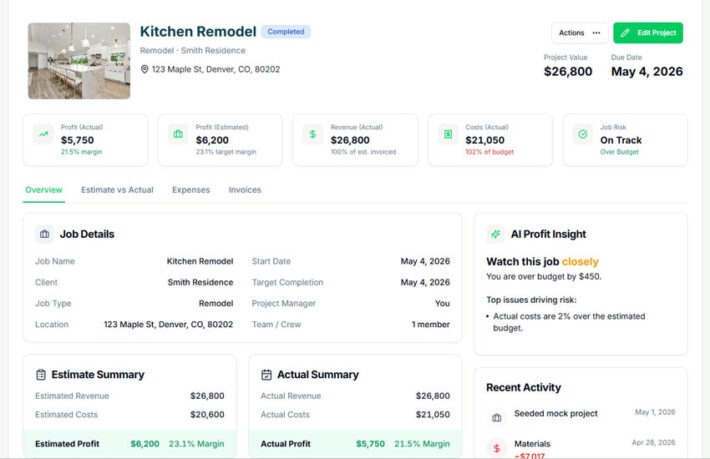
WorkBalance is built to connect everything in one place.
Instead of separating projects, tasks, and finances, it brings them together.
With WorkBalance, you can:
- Create projects with defined budgets
- Track expenses as they happen
- Assign costs directly to jobs
- Monitor budget vs actual in real time
- See profit before the job is complete
This changes everything.
You’re no longer guessing.
You’re operating with real visibility.
WorkBalance turns job profitability from a question into a clear answer.
A Simple Example
Let’s say you take on a project for $25,000.
At the start, everything looks good.
But as the job progresses:
- Labor increases by $2,000
- Materials cost $1,500 more than expected
- Small expenses add another $500
Now you’ve lost $4,000 in margin.
If you only discover this at the end, it’s too late.
But if you see it during the job, you can adjust.
That’s the difference between reacting and controlling.
What Happens When You Know Your Job Profitability
When you can clearly see if a job is profitable, your entire business improves.
You:
- Price jobs more accurately
- Avoid unprofitable work
- Catch problems early
- Build consistent margins
Over time, this leads to predictable growth.
Instead of guessing, you operate with confidence.
Final Thought
Knowing if a job is profitable is not optional.
It’s the foundation of a successful project-based business.
Most businesses don’t fail because they lack work.
They fail because they don’t understand their numbers.
If you can’t see your profit clearly, you can’t control your business.
Take Control of Your Job Profitability
WorkBalance helps you:
- Track costs per project in real time
- Compare budget vs actual instantly
- See exactly which jobs are profitable
Because profit shouldn’t be a surprise—it should be something you control.