WorkBalance Features: Run Your Entire Business in One Platform

Running a business today often means juggling multiple tools—one for projects, another for invoicing, something else for expenses, and spreadsheets to tie it all together. While each tool may do its job well, the result is usually fragmentation, confusion, and a lack of real visibility into how your business is actually performing.
This is exactly the problem WorkBalance was built to solve.
WorkBalance is an all-in-one business management platform designed to bring projects, finances, and teams into a single, connected system. Instead of switching between tools, you can manage your entire operation from one place—giving you clarity, control, and confidence in your decisions.
In this guide, we’ll walk through the core WorkBalance features and how they work together to help you run a more efficient and profitable business.
Why All-in-One Business Management Matters
Before diving into the features, it’s important to understand why a unified platform matters.
Most small businesses and contractors operate like this:
- Projects tracked in one tool
- Tasks managed somewhere else
- Invoices created separately
- Expenses recorded manually
- Profit calculated (if at all) in spreadsheets
The result? You don’t have a real-time view of your business.
WorkBalance changes that by connecting everything:
Projects → Tasks → Budgets → Invoices → Payments → Reporting
This means every action in your business feeds into a single system, giving you real-time visibility into both operations and finances.
Project Management That Actually Connects to Your Business
At the core of WorkBalance is its project management system. But unlike traditional project tools, WorkBalance doesn’t treat projects as isolated workflows—it connects them directly to your financials and operations.
You can create and manage projects from start to finish, keeping everything—from tasks to documents to budgets—organized in one place.
Each project becomes a central hub where you can:
- Track progress and milestones
- Assign tasks to team members or contractors
- Store relevant documents
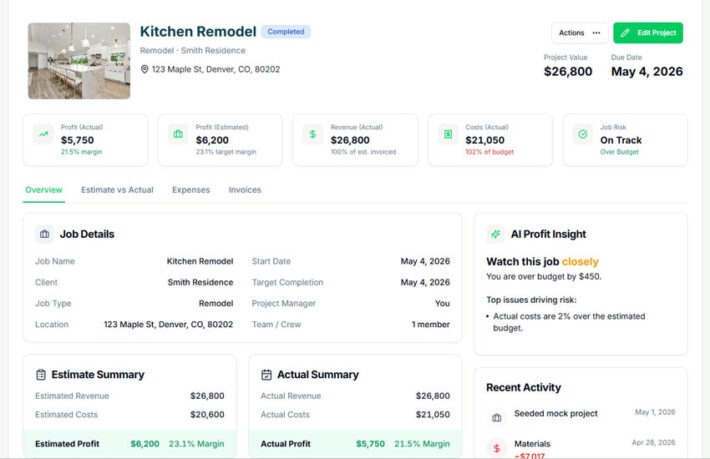
- Monitor costs and profitability
This eliminates the need to jump between tools just to understand what’s happening on a single job.
Task Management Built for Execution
Every project is broken down into tasks, making it easy to manage the day-to-day execution of work.
WorkBalance offers multiple task views, including:
- Table view for structured tracking
- Kanban board for visual workflow management
- Timeline view for scheduling
Tasks can be assigned, prioritized, and tracked with clear statuses like:
- Not Started
- In Progress
- Completed
What makes WorkBalance different is that tasks are not just checklists—they are tied to real business outcomes. Tasks connect directly to projects, timelines, and even financial performance, ensuring nothing falls through the cracks.
Project Timeline for Real Visibility
Planning is one thing—seeing your plan clearly is another.
The WorkBalance timeline (Gantt-style view) gives you a visual representation of your entire project schedule. You can:
- See upcoming deadlines
- Adjust timelines with drag-and-drop functionality
- Track milestones
- Understand how tasks align over time
This is especially valuable for businesses managing multiple projects at once. Instead of guessing what’s coming next, you can see it clearly.
Budget Tracking That Tells You the Truth
One of the biggest challenges for businesses—especially project-based ones—is understanding whether they are actually making money.
WorkBalance solves this with built-in project budget tracking.
For each project, you can:
- Set an initial budget
- Track actual expenses as they occur
- Compare estimated vs actual costs
- Monitor cost overruns
This gives you real-time insight into project profitability, not just after the fact.
Instead of asking:
“Did we make money on that job?”
You’ll know the answer while the work is still happening.
Estimates and Invoicing in One Workflow
Creating estimates and sending invoices are essential parts of running a business—but they’re often disconnected from project execution.
WorkBalance connects these steps into a seamless workflow.
You can:
- Create detailed estimates with line items
- Convert estimates directly into invoices
- Track invoice status (pending, paid, overdue)
- Keep everything tied to the project
This eliminates duplicate work and reduces errors. It also ensures that your financial records stay aligned with your actual work.
Payments Made Simple
Getting paid should be easy—but for many businesses, it isn’t.
WorkBalance integrates payment functionality directly into the platform, allowing you to:
- Send payment-ready invoices
- Accept payments online
- Track payments in real time
Because payments are tied to invoices and projects, you always know:
- What has been paid
- What is outstanding
- How it impacts your cash flow
This level of visibility is critical for maintaining a healthy business.
Expense Tracking Without the Headaches
Tracking expenses is often one of the most tedious parts of running a business—but it’s also one of the most important.
WorkBalance simplifies this by allowing you to:
- Log expenses quickly
- Categorize spending
- Attach receipts or documents
- Tie expenses directly to projects
This ensures that every cost is accounted for and properly linked to the work it supports.
No more lost receipts. No more guessing where money went.
Customer and Contractor Management
WorkBalance isn’t just about tasks and numbers—it’s about people.
The platform includes built-in tools for managing both customers and contractors.
For customers, you can:
- Store contact information
- Link projects, invoices, and payments
- Keep everything organized in one profile
For contractors, you can:
- Assign tasks
- Track involvement in projects
- Maintain clear visibility into who is doing what
This keeps your entire operation aligned, even when multiple people are involved.
Document Management That Keeps Everything Organized
Documents are a critical part of running projects—contracts, receipts, plans, photos—but they often end up scattered across folders and emails.
WorkBalance keeps documents organized by attaching them directly to:
- Projects
- Tasks
- Customers
- Contractors
- Financial records
This means you always know where to find what you need.
Instead of searching through files, everything is exactly where it belongs.
Reporting That Actually Helps You Make Decisions
Data is only useful if it helps you make better decisions.
WorkBalance provides built-in reporting tools that give you a clear view of your business performance.
You can track:
- Revenue and expenses
- Profit and loss
- Project-level profitability
- Cash flow trends
Because all data is connected, these reports are accurate and up to date—no manual reconciliation required.
Templates That Save You Time
Repetitive work slows businesses down.
WorkBalance includes templates for:
- Projects
- Tasks
- Budgets
- Estimates
This allows you to standardize workflows and reduce setup time.
Instead of starting from scratch every time, you can reuse proven structures and focus on execution.
A Dashboard That Brings It All Together
All of these features come together in a centralized dashboard.
From one screen, you can see:
- Active projects
- Tasks due today
- Financial summaries
- Key business metrics
This gives you a real-time snapshot of your entire operation.
Instead of asking multiple questions across different tools, you get answers instantly.
What Makes WorkBalance Different
There are plenty of tools that handle projects. Others handle accounting. A few attempt to connect the two.
WorkBalance is built from the ground up to unify them.
It’s not just about managing work—it’s about understanding your business.
With WorkBalance, you always know:
- What work is happening
- What it costs
- What you’re earning
- And whether you’re profitable
Final Thoughts
If you’re tired of managing your business across multiple disconnected tools, WorkBalance offers a simpler, more powerful approach.
By bringing projects, finances, and teams into one platform, it gives you the clarity and control you need to grow.
Because at the end of the day, running a business shouldn’t feel chaotic.
It should feel balanced.