Best Way to Track Contractor Expenses (Without Losing Profit)

Most contractors don’t lose money because they lack work.
They lose money because they don’t track their expenses properly.
Projects get completed. Clients get billed. Revenue comes in. But when it’s time to evaluate profitability, the numbers don’t add up the way they should. Margins are thinner than expected, and it’s not always clear why.
This is one of the most common—and most expensive—problems in project-based businesses.
The issue isn’t effort. It’s visibility.
If you don’t have a clear system for tracking contractor expenses, you’re making decisions based on incomplete information. Over time, that leads to missed costs, inaccurate estimates, and shrinking profit margins.
The good news is there is a better way.
Why Expense Tracking Fails for Most Contractors
Most contractors don’t intentionally ignore expense tracking. They simply rely on systems that don’t scale.
They use:
- Spreadsheets
- Notes
- Receipts
- Memory
At the beginning, this works. There are fewer projects, fewer expenses, and everything feels manageable.
But as the business grows, complexity increases.
- More jobs running at once
- More expenses being recorded
- More people involved
And the system starts to break.
Expenses get delayed, missed, or miscategorized. Data becomes outdated. Visibility disappears.
At that point, you’re no longer tracking your costs—you’re estimating them.
And estimating costs is the fastest way to lose profit.
The Real Problem: Expenses Aren’t Tied to Jobs
The biggest mistake contractors make is tracking expenses at a high level instead of at the project level.
They know:
- Total expenses
- Total revenue
But they don’t know:
- Which job each expense belongs to
- Which projects are profitable
- Where costs are going over
This creates a major blind spot.
You might think your business is doing well overall, but certain jobs could be losing money without you realizing it.
If expenses aren’t tied to projects, you can’t control your margins.
What the Best Expense Tracking System Looks Like
The best way to track contractor expenses isn’t complicated, but it does require structure.
A strong system should do three things:
- Assign every expense to a project
- Track costs in real time
- Compare actual costs to budget
If your system doesn’t do all three, you’re missing critical information.
Let’s break this down step by step.
Step 1: Assign Every Expense to a Job
Every dollar you spend should be tied to a specific project whenever possible.
This includes:
- Materials
- Labor
- Subcontractors
- Equipment
Instead of tracking expenses generally, you categorize them by job.
This gives you immediate clarity.
You can see exactly how much each project is costing you and whether it’s staying within budget.
This is the foundation of job costing.
Step 2: Capture Expenses in Real Time
Most contractors track expenses after the fact.
They update spreadsheets at the end of the week or enter data once the project is complete.
This delay creates problems.
- Data becomes inaccurate
- Costs are forgotten
- Decisions are delayed
The best systems capture expenses as they happen.
- Record purchases immediately
- Track labor daily
- Log unexpected costs right away
This ensures your data is always current.
If your numbers aren’t real-time, your decisions won’t be either.
Step 3: Categorize Costs Clearly
Tracking total expenses is not enough.
You need to understand where your money is going.
That means breaking costs into categories such as:
- Labor
- Materials
- Subcontractors
- Equipment
- Overhead
This allows you to identify patterns.
For example:
- Labor consistently exceeding estimates
- Material costs trending higher than expected
Without categories, you’re just looking at totals.
With categories, you gain insight.
Step 4: Compare Budget vs Actual
This is where expense tracking becomes powerful.
For every project, you should know:
- What you planned to spend
- What you’ve actually spent
- The difference between the two
This comparison helps you catch problems early.
If costs are trending higher than expected, you can:
- Adjust labor
- Re-evaluate materials
- Make changes before profit disappears
The goal isn’t just to track expenses—it’s to control them.
Step 5: Review Projects Consistently
A system is only effective if you use it consistently.
You should review your projects regularly—at least once per week.
Ask:
- Are we on budget?
- What’s over?
- What needs to change?
This turns expense tracking into an active management tool.
Why Spreadsheets Stop Working
Spreadsheets are often the starting point for expense tracking.
They’re flexible and easy to use.
But as your business grows:
- Data becomes outdated
- Updates are inconsistent
- Multiple versions exist
- Visibility is lost
Spreadsheets rely on manual effort, and that effort doesn’t scale.
Eventually, they become unreliable.
Spreadsheets track data—but they don’t manage your business.
How WorkBalance Simplifies Expense Tracking
This is exactly the problem WorkBalance solves.
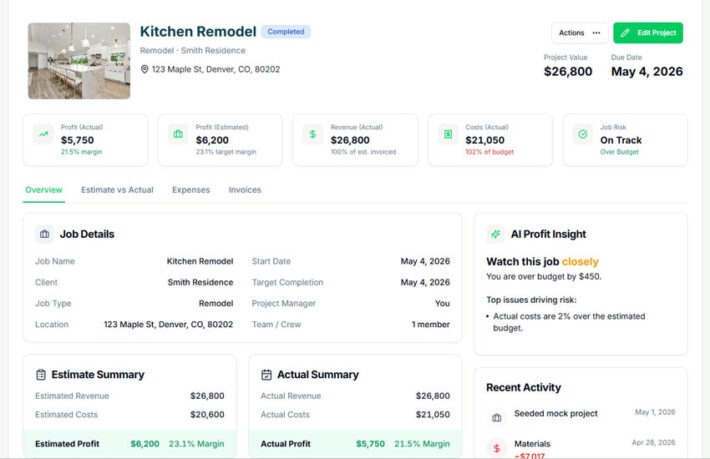
Instead of using separate tools for projects, tasks, and finances, WorkBalance connects everything in one system.
With WorkBalance, you can:
- Assign expenses directly to projects
- Track costs in real time
- Monitor budgets as work progresses
- See profit before the job is complete
This eliminates the friction that causes most expense tracking systems to fail.
Tracking expenses becomes automatic instead of manual.
What Happens When You Get This Right
When you implement a proper expense tracking system, your business changes.
You gain:
- Clear visibility into your costs
- Better control over projects
- More accurate pricing
- Consistent profit margins
You stop guessing and start making informed decisions.
Final Thought
The best way to track contractor expenses is not about using more tools.
It’s about using the right system.
One that connects your work, your costs, and your profit in real time.
Because at the end of the day, profit isn’t something you calculate later.
It’s something you manage as the work happens.
Take Control of Your Expenses
WorkBalance helps you:
- Track contractor expenses per project
- Connect budgets and real-time costs
- See your profit as work happens
Because tracking expenses isn’t enough—you need to control them.