How to Track Multiple Jobs at Once (Without Losing Control or Profit)

Running one job is manageable.
Running three starts to feel busy.
Running five or more at the same time is where things begin to break.
Not because the work is impossible, but because visibility disappears. You’re no longer looking at a single stream of activity—you’re trying to manage multiple moving parts, each with its own timeline, costs, priorities, and risks.
At that point, the challenge is no longer execution. It’s coordination.
And without a system that brings everything together, coordination turns into guesswork.
The Real Problem Isn’t Volume—It’s Fragmentation
When businesses take on multiple jobs at once, they don’t just increase their workload—they multiply complexity. Each job generates its own set of tasks, expenses, communications, and timelines.
If those elements are tracked in different places, the problem compounds quickly.
You might have:
- Tasks in one tool
- Expenses in another
- Notes in emails or texts
- Budgets in spreadsheets
Individually, each system works. Together, they create fragmentation.
The result is a constant need to switch context, reconcile information, and fill in gaps. Important details get missed not because people aren’t paying attention, but because the information isn’t connected.
When your data is fragmented, your attention is fragmented too.
Why Tracking Multiple Jobs Feels Overwhelming
The feeling of overwhelm doesn’t come from the number of jobs alone. It comes from uncertainty.
You’re unsure:
- Which job needs attention right now
- Which one is over budget
- Which one is falling behind
- Where your time is actually going
Without clear visibility, everything feels urgent. And when everything feels urgent, priorities become unclear.
That’s when mistakes happen.
The Shift: From Managing Jobs to Managing Systems
Most people try to solve this problem by working harder. They check in more often, communicate more frequently, and try to keep everything in their head.
That approach works temporarily, but it doesn’t scale.
The real shift happens when you stop managing individual jobs and start managing the system that supports them.
Instead of asking, “What’s happening on Job A?” you ask, “Do I have a clear view of all jobs at once?”
This shift changes everything.
Step 1: Create a Single Source of Truth
The first step in tracking multiple jobs is consolidation. All critical information—tasks, costs, timelines, and progress—needs to exist in one place.
This doesn’t mean simplifying the work. It means simplifying where the work is tracked.
A single source of truth eliminates the need to jump between systems. It ensures that everyone is working from the same information. And it reduces the risk of miscommunication.
Clarity begins when everything is visible in one place.
Step 2: Use Projects as Containers
Each job should function as its own container within the system. All tasks, expenses, and updates related to that job should live inside that container.
This creates structure.
Instead of dealing with a long list of disconnected activities, you have clearly defined projects. Each one has its own scope, its own budget, and its own progress.
When everything is organized this way, it becomes easier to switch focus without losing context.
Step 3: Track Progress at the Job Level, Not Just the Task Level
Tasks are important, but they don’t tell the full story. Completing tasks doesn’t necessarily mean a job is on track.
You need to understand how each job is progressing as a whole.
This includes:
- Percentage of completion
- Budget vs actual cost
- Time spent vs expected time
When you can see progress at the job level, you can identify which projects are moving smoothly and which ones need attention.
Step 4: Make Cost Visibility Immediate
Costs are where multiple jobs become risky.
When you’re managing several projects at once, it’s easy for expenses to blend together. A purchase made for one job might not be recorded correctly. Time spent on different projects may not be tracked accurately.
Over time, these small issues distort your understanding of profitability.
To prevent this, costs need to be tracked as they happen and tied directly to the correct job. This creates a clear financial picture for each project, even when multiple jobs are running simultaneously.
If costs aren’t separated by job, profit can’t be understood by job.
Step 5: Prioritize Based on Visibility, Not Urgency
When everything feels urgent, it’s tempting to react to whatever is in front of you. But reacting without context often leads to misaligned priorities.
Instead, priorities should be based on visibility.
Which job is over budget? Which one is behind schedule? Which one has the highest impact on your business?
When you have a clear view of all jobs, prioritization becomes logical instead of emotional.
Step 6: Build a Rhythm of Review
Tracking multiple jobs is not a one-time setup—it’s an ongoing process.
Establishing a regular rhythm of review ensures that nothing slips through the cracks. This could be a daily check-in, a weekly review, or a combination of both.
The goal is to maintain awareness.
Even a short review can surface issues early, giving you the opportunity to adjust before they become larger problems.
Why Spreadsheets and Ad-Hoc Systems Break Down
Spreadsheets can work when managing a small number of jobs, but they struggle as complexity increases.
Data entry becomes inconsistent. Updates are delayed. Multiple versions of the same file create confusion. Most importantly, spreadsheets don’t provide a real-time view of multiple projects.
As the number of jobs grows, the system becomes harder to maintain. Instead of providing clarity, it creates friction.
How WorkBalance Simplifies Multi-Job Tracking
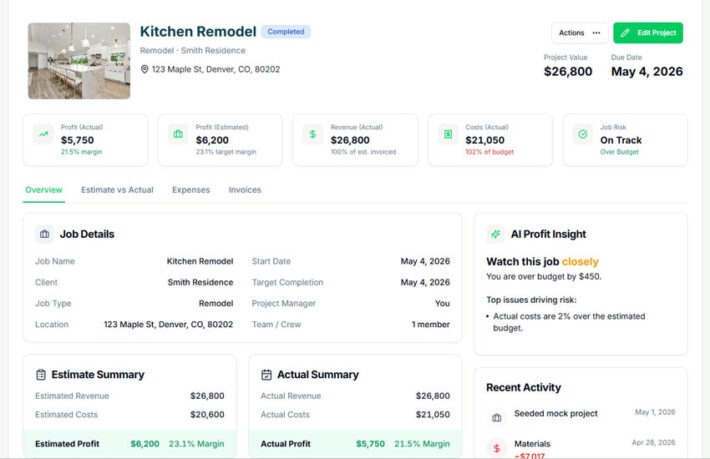
WorkBalance was built to handle exactly this challenge. It provides a single platform where all jobs can be tracked simultaneously, with each project acting as its own structured container.
Within that system, you can:
- Track tasks, costs, and progress for each job
- View all projects in one place
- Monitor budget vs actual in real time
- See how time and expenses are distributed across jobs
Because everything is connected, you don’t need to manually piece together information. The system provides a clear, up-to-date view of your entire workload.
You’re not just managing jobs—you’re managing how they interact.
The Advantage of Clarity at Scale
When multiple jobs are tracked effectively, the benefits extend beyond organization.
You gain:
- Better control over resources
- More accurate understanding of profitability
- The ability to scale without losing visibility
Instead of feeling overwhelmed, you feel informed. Instead of reacting, you’re making deliberate decisions.
Final Thought
Managing multiple jobs at once is not inherently difficult. What makes it difficult is the lack of visibility.
When information is fragmented, priorities become unclear. When priorities are unclear, decisions become reactive.
But when everything is connected—when you can see your jobs, your costs, and your progress in one place—the complexity becomes manageable.
Clarity turns complexity into control.
Take Control of Multiple Jobs
WorkBalance helps you:
- Track multiple projects in one place
- Connect tasks, costs, and timelines
- Monitor progress and profitability in real time
- Stay organized without added complexity
Because growth shouldn’t come with confusion.