How to Track Job Costs for Contractors (Step-by-Step Guide)

Most contractors don’t have a revenue problem.
They have a visibility problem.
You’re doing the work. Money is coming in. Jobs are getting completed.
But at the end of the month, you’re asking:
“Where did the profit go?”
The answer is almost always the same:
You’re not tracking your job costs properly.
And by the time you realize it, it’s already too late.
This guide will show you exactly how to track job costs the right way—so you know your profit before the job is finished, not after.
What Is Job Costing (In Simple Terms)
Job costing is tracking every dollar that goes into a specific project.
Not your business overall.
Not your monthly expenses.
Per job. In real time.
That includes:
- Labor
- Materials
- Subcontractors
- Equipment
- Overhead
If you’re missing any of these, your numbers are wrong.
Why Most Contractors Get This Wrong
Most contractors track costs in one of three ways:
- A spreadsheet they update “when they have time”
- Notes or receipts they plan to organize later
- Memory (“I think we’re doing fine on this one”)
None of these work once you’re running multiple jobs.
Here’s what actually happens:
- Labor runs over
- Materials cost more than expected
- Small expenses pile up
- Nobody notices until the job is done
And suddenly:
Your 20% margin job is now 8%… or worse.
What You Should Be Able to See (At Any Time)
If your system is working, you should be able to answer this instantly:
- How much have we spent on this job?
- How much is left in the budget?
- Are we ahead or behind?
- What is our current profit?
If you can’t answer those questions in under 30 seconds, you don’t have control of your jobs.
Step 1: Break Every Job Into Cost Categories
Before you track anything, you need structure.
Every job should be broken into these 5 categories:
1. Labor (Your Biggest Cost)
This includes:
- Employee wages
- Overtime
- Payroll burden (taxes, insurance)
Example:
- 2 workers × 40 hours × $30/hour = $2,400
- Real cost with burden ≈ $3,000+
Most contractors underestimate labor. That’s where margin disappears first.
2. Materials
Track:
- All purchased materials
- Delivery fees
- Waste or overages
Example:
- Lumber: $4,000
- Delivery: $250
- Waste: $300
Total = $4,550 (not $4,000)
3. Subcontractors
Include:
- Fixed bids
- Hourly subcontractors
These often look “clean” but can still go over with change orders.
4. Equipment
Track:
- Rentals
- Fuel
- Usage costs
Even owned equipment should have a cost allocated.
5. Overhead (The Most Ignored Category)
This includes:
- Insurance
- Office/admin time
- Vehicles
- Software
You don’t need perfect allocation—but you need something.
If you ignore overhead, you’re overestimating profit.
Step 2: Set a Job Budget Before You Start
Every job needs a target.
That’s your budget.
Example:
| Category | Budget |
|---|---|
| Labor | $10,000 |
| Materials | $8,000 |
| Subcontractors | $5,000 |
| Equipment | $2,000 |
| Overhead | $3,000 |
| Total Cost | $28,000 |
If your contract is $35,000:
Expected profit = $7,000 (20%)
This is your baseline.
Step 3: Track Costs in Real Time (This Is Where Most Fail)
This is the difference between:
- Guessing
- Running a business
Most contractors track costs:
- At the end of the week
- After the job is done
That doesn’t work.
You need to:
- Log labor daily
- Enter expenses immediately
- Update subcontractor costs as they happen
The goal: always know where the job stands today
Step 4: Compare Budget vs Actual (Constantly)
This is where job costing becomes powerful.
Example mid-project:
| Category | Budget | Actual |
|---|---|---|
| Labor | $10,000 | $11,500 |
| Materials | $8,000 | $8,200 |
You’re already over budget.
Now you can:
- Adjust labor
- Control remaining costs
- Prevent further loss
If you don’t track this:
You won’t know until it’s too late.
Step 5: Track Profit While the Job Is Running
You should always know:
“If we stopped this job today, are we making money?”
That’s real control.
Not after-the-fact accounting.
Step 6: Review Every Job After Completion
This is how you improve.
Ask:
- Where did we go over?
- What did we underestimate?
- What would we change next time?
Then apply it to future bids.
This is how top contractors increase margins over time.
Real-World Example (Where Profit Disappears)
Let’s say:
- Job value: $50,000
You estimate:
- Costs: $40,000
- Profit: $10,000 (20%)
Reality:
- Labor overruns: +$4,000
- Materials increase: +$2,000
Actual cost: $46,000
Actual profit: $4,000 (8%)
That’s a 60% drop in profit.
And it happens all the time.
Why Spreadsheets Break at This Point
Spreadsheets work when:
- You’re small
- You have time
- You’re disciplined
They fail when:
- You run multiple jobs
- Multiple people are involved
- You need real-time updates
You end up with:
- Outdated numbers
- Manual errors
- No visibility
The Better Way: Connected Job Costing
You need a system where:
- Projects
- Budgets
- Expenses
- Tasks
…are all connected.
That’s the shift from:
Tracking → Managing
Where Software Changes Everything
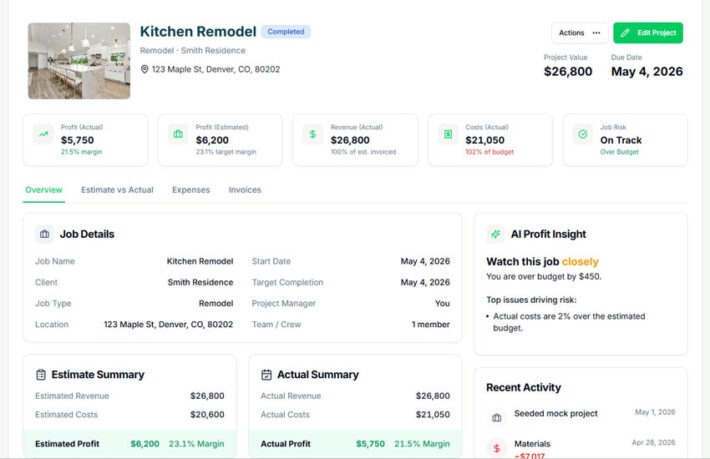
With a system like WorkBalance:
- Costs are tracked in real time
- Budgets update automatically
- You see profit as the job progresses
- Everything is in one place
No spreadsheets. No guessing.
Common Job Costing Mistakes (Avoid These)
- Only tracking materials
- Ignoring labor burden
- Not allocating overhead
- Updating costs too late
- Not reviewing completed jobs
Frequently Asked Questions (SEO Boost Section)
How often should I track job costs?
Daily. Minimum.
What’s the biggest cost contractors miss?
Labor and overhead.
Can I use spreadsheets for job costing?
Yes—but only at a very small scale.
What’s the biggest benefit of job costing?
Knowing your profit before the job ends.
The Bottom Line
Job costing isn’t accounting.
It’s control over your business.
The contractors who win:
- Know their numbers
- Adjust early
- Price correctly
Everyone else:
Finds out too late.
Want to See Your Profit in Real Time?
If you’re still using spreadsheets or disconnected tools, you’re always going to be behind.
WorkBalance was built specifically for project-based businesses to:
- Track job costs
- Manage budgets
- See profit in real time
No guesswork. No surprises.