Why Spreadsheets Fail for Job Costing

For most small businesses, spreadsheets are where everything starts.
They feel simple, flexible, and easy to control. You can build a quick estimate, track some expenses, and calculate totals all in one place. At first, it works well enough, especially when you’re managing only a few jobs and your operations are relatively simple. But as your business grows, the limitations of spreadsheets start to surface in subtle ways.
You begin to notice that numbers don’t quite match. Some costs are missing. Data feels outdated. Jobs go over budget without warning. Profit becomes harder to understand, and instead of gaining clarity, you feel like you’re constantly trying to piece things together. The system you relied on starts to create more confusion than control.
The problem is that spreadsheets don’t fail all at once. They fail gradually, and by the time the cracks become obvious, they’ve already impacted your margins.
The Illusion of Control
Spreadsheets give you the feeling that everything is organized. You have rows, columns, formulas, and totals, which creates a sense of structure and control. But that control is often misleading because spreadsheets don’t reflect what’s actually happening in your business in real time.
Every spreadsheet depends on someone updating it. Expenses have to be entered manually. Labor hours need to be recorded after the fact. Changes require someone to remember to go back and update the data. This creates a lag between what’s happening in the field and what’s being reflected in your numbers.
As a result, the data you’re looking at is almost always behind. You’re not making decisions based on current reality—you’re reacting to outdated information. That gap between reality and reporting is where problems start to grow unnoticed.
When your data is delayed, your decisions are delayed—and that costs money.
Job Costing Requires Real-Time Accuracy
Job costing is not just about recording expenses. It’s about understanding whether a job is still profitable while it’s happening. That requires real-time visibility into costs, labor, and budget performance.
To manage a job properly, you need to know how much you’ve spent so far, how much work is left, and whether you are still within your expected margin. These are dynamic questions that change daily, sometimes hourly. A system that relies on manual updates simply can’t keep up with that level of activity.
Spreadsheets were designed for static data, not for tracking ongoing operations. They can show you what happened after a job is complete, but they struggle to tell you what’s happening during the job. Without that visibility, you lose the ability to adjust and protect your profit.
Profit is not something you calculate at the end—it’s something you manage in real time.
The Core Problem: Manual Data Entry
At the center of every spreadsheet is manual data entry, and that is where most issues begin. No matter how well-designed your spreadsheet is, it still depends on people entering information consistently and accurately.
In real-world conditions, that rarely happens. Data gets entered late because people are busy. Some expenses never get recorded at all. Numbers are typed incorrectly, formulas break, and updates are skipped. Each of these issues may seem small on its own, but over time they compound into significant inaccuracies.
The more your business grows, the more data needs to be tracked. That increases the chances of errors and inconsistencies. Eventually, you reach a point where the spreadsheet can no longer be trusted as a reliable source of truth.
If your system depends on perfect manual input, it will eventually break.
No Connection Between Work and Money
Another major limitation of spreadsheets is that they do not naturally connect different parts of your business. In most cases, projects are tracked in one place, tasks in another, expenses somewhere else, and invoices in a separate system entirely.
Because these systems are disconnected, you lose visibility into how everything ties together. You may know your total expenses, but you don’t know which job those costs belong to. You may see revenue coming in, but you don’t know which projects are actually driving profit.
This lack of connection creates blind spots. You cannot clearly see which jobs are over budget, which ones are performing well, or where profit is being lost. Instead, you are left trying to piece together information from multiple sources.
When your systems aren’t connected, your insights aren’t either.
Version Control and Data Confusion
As more people interact with a spreadsheet, another issue begins to surface: version control. Multiple team members may have access to the file, leading to duplicate versions, conflicting updates, and confusion about which data is correct.
You’ve likely seen this before. Someone updates a file locally while another person makes changes to a shared version. Numbers don’t match, and time is wasted trying to reconcile differences. Even worse, decisions get made based on incorrect or outdated information.
Over time, trust in the data begins to erode. If you can’t rely on your numbers, you can’t rely on your decisions.
No Real Visibility Into Profit
Perhaps the biggest limitation of spreadsheets is their inability to provide clear, real-time visibility into profit. While you may be able to calculate profit after a job is completed, that information comes too late to be useful.
During the job, when decisions matter most, you are often operating without a clear understanding of your financial position. You don’t know if costs are creeping up or if your margin is shrinking. By the time you identify a problem, the opportunity to fix it has already passed.
This reactive approach is one of the main reasons businesses struggle to maintain consistent profitability.
If you only see profit at the end, you can’t control it during the job.
Spreadsheets Don’t Scale With Your Business
Spreadsheets can handle a small number of jobs, but they become increasingly difficult to manage as complexity grows. More projects mean more data, more updates, and more opportunities for errors.
To compensate, businesses often add more tabs, more formulas, and more manual processes. Instead of simplifying operations, the spreadsheet becomes a complex system that requires constant maintenance.
At that point, you’re not just running your business—you’re managing your spreadsheet.
The Hidden Cost of Spreadsheets
Spreadsheets are often seen as a free solution, but they come with hidden costs that are easy to overlook. Time spent updating data, correcting errors, and reconciling discrepancies adds up quickly. Missed expenses and inaccurate reporting can lead to poor decisions that impact your bottom line.
The most significant cost, however, is lost profit. When your system fails to provide accurate, timely insights, you lose the ability to make informed decisions. That leads to inefficiencies, budget overruns, and reduced margins.
The true cost of spreadsheets isn’t visible—but it’s always there.
How WorkBalance Solves This Problem
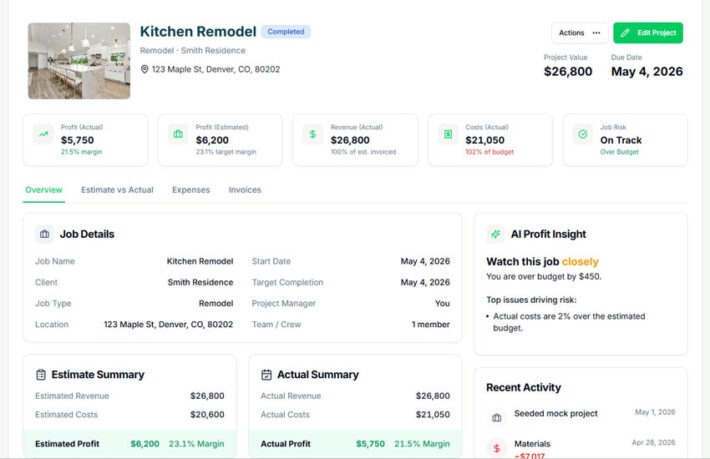
WorkBalance eliminates the need for disconnected tools and manual tracking by bringing everything into one system. Instead of relying on spreadsheets, you can manage your projects, tasks, budgets, expenses, invoices, and reports in a single platform.
This creates a direct connection between work and money. As expenses occur, they are automatically tied to the appropriate project. As work progresses, you can see how it impacts your budget and profitability in real time.
With this level of visibility, you can make informed decisions as the job unfolds. You can identify issues early, adjust your approach, and protect your margins before it’s too late.
You’re no longer tracking what happened—you’re managing what’s happening.
The Shift From Tracking to Control
The real advantage of moving away from spreadsheets is not just improved tracking—it’s improved control. When you have accurate, real-time data, you can respond quickly to changes and keep your projects on track.
Instead of reacting to problems after they occur, you can prevent them from happening in the first place. This shift from reactive to proactive management is what allows businesses to scale successfully.
Final Thought
Spreadsheets are a great starting point, but they are not designed to support a growing, project-based business. At some point, the limitations become too significant to ignore.
The question is not whether spreadsheets will fail—it’s when.
Businesses that recognize this early and move to a connected system gain a significant advantage. They operate with clarity, make better decisions, and maintain stronger control over their margins.
If you want to grow your business, you need a system that grows with it.
Take Control of Your Job Costing
WorkBalance helps you:
- Track costs per project in real time
- Connect projects, tasks, and finances
- Monitor budget vs actual instantly
- See profit as work happens
Because your business should run on clarity—not spreadsheets.